
 Officiële Audi Radiocode Ontgrendeling
Audi Radiocode Online Generator
Heeft u de code voor uw Audi autoradio nodig? Vraag deze direct online op met het serienummer.
Audi Radio Ontgrendelen
Directe geautomatiseerde decodering via serienummer

Hoe u uw Audi radiocode aanvraagt
Bereken uw Audi radiocode aan de hand van het serienummer op het label van de radio en ontgrendel uw apparaat direct.
Gegarandeerde Betrouwbaarheid & 24/7 Support
Ervaar de snelste en meest betrouwbare radiocode service van Europa.

Risk-free code retrieval for your Audi
Use our service with confidence. If the code we provide for your Audi doesn’t work, we will ensure a full refund without hassle.

Guaranteed accuracy for your Audi code
Get the exact code for your Audi radio. Our service is designed to avoid errors and deliver the right solution at the first attempt.

Secure and reliable unlocking for Audi
Trust our unlocking service for your Audi radio. If there’s any issue with the code, we’ll refund your money immediately without delay.
Hoe het werkt
Activeer uw autoradio en luister weer naar uw muziek in drie eenvoudige stappen.
Vind het Radio Serienummer
Vind het 14-cijferige serienummer op het scherm (knoppen 1 & 6 ingedrukt houden) of op de sticker op de behuizing.
Directe Berekening
Voer uw serienummer in onze decoder in. Ons systeem berekent de originele fabriekscode direct.
Code Invoeren & Muziek Luisteren
Uw 4-cijferige ontgrendelcode verschijnt op het scherm en wordt gemaild. Voer deze in met knoppen 1-4 om te ontgrendelen.
Zo vindt u uw Audi radio serienummer
Uw serienummer is nodig om de officiële fabrieksontgrendelcode te genereren. Volg de onderstaande handleiding.

Remove your radio
Insert standard Audi 4-key radio removal keys into the slim horizontal or vertical release slots until they click into place. Pull both keys outward slightly to release the internal spring catches and slide the head unit smoothly forward out of the console.
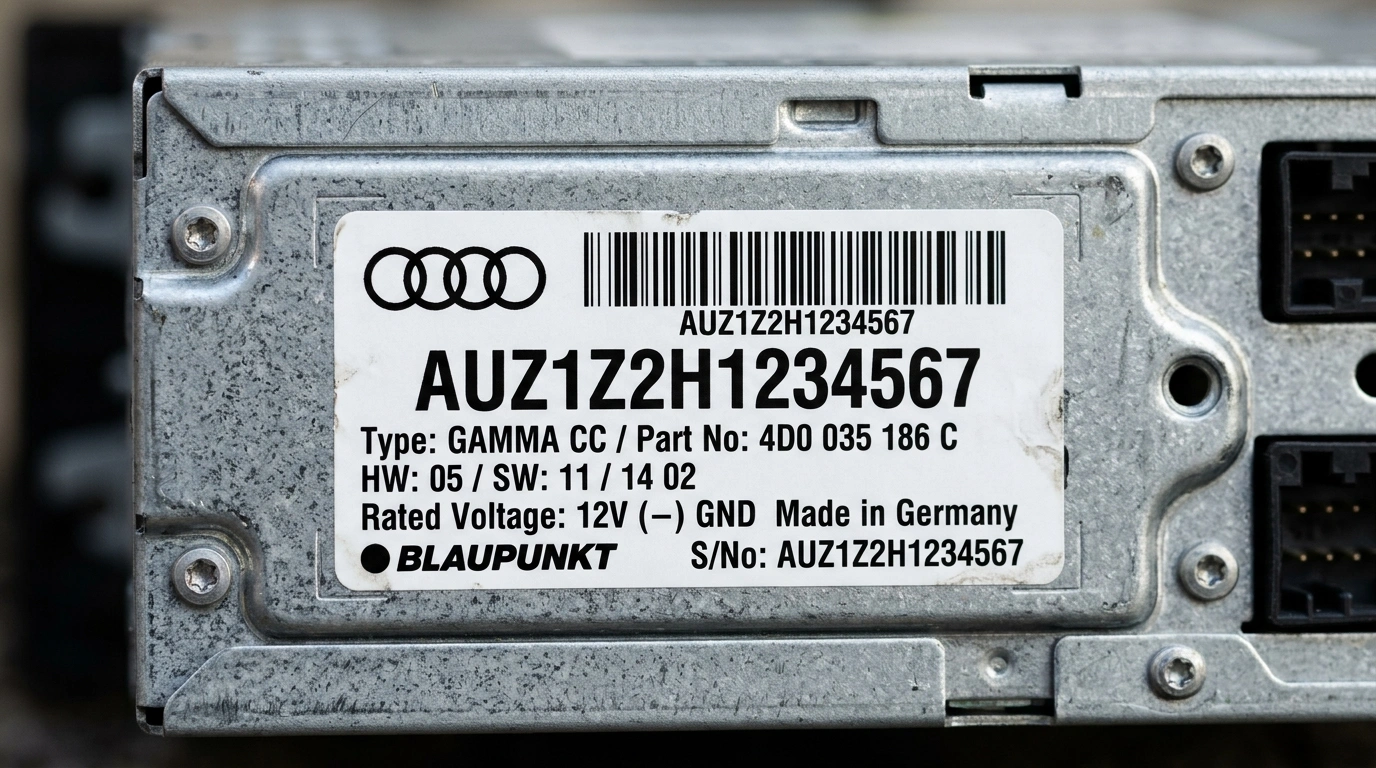
Find your serial number on the label
Your serial number is printed on a sticker or stamped on the side or rear of the casing. All Audi serials start with AUZ and are 14 characters long.

Common Audi radios
Pictured: Audi Concert. Other common units include Audi Symphony, Chorus, RNS-E Navigation Plus, and BNS 5.0. The serial number is located on the casing sticker.
How to Enter Your Audi Radio Code
Once you receive your 4-digit factory unlock code by email, follow these easy steps to enter it into your Audi stereo:
Audi radio codes by model
Go straight to the guide for your model.
Wat Onze Klanten Zeggen
Lees echte beoordelingen van autobezitters die hun autoradio met onze service hebben ontgrendeld.
“SKZ-nummer van mijn Škoda Octavia Bolero ingegeven, code ontvangen in 3 minuten. PIN werkte vlekkeloos en geluid is terug. Vlotte en zorgeloze service!”
“Accu leeg van Škoda Superb en Swing radio vergrendeld in SAFE. Dealer vroeg £65 en 3 dagen geduld. Hier nummer ingevoerd en binnen 3 minuten de juiste code. Briljant!”
“Meteen raak bij mijn Škoda Fabia Dance autoradio. Eenvoudige handleiding, supersnelle mail en honderden euro's uitgespaard. 10/10!”