
 Official Audi Radio Decoding
Audi Radio Code Online Generator
Need the code for your Audi radio? Get it now online by providing the radio serial number.
Unlock Audi Radio
Instant automated decoding by serial

How to get your Audi radio code
Calculate your Audi radio code from the serial number. You can find this number on the side or top label of the radio box. Once located, input it into our online decoder to release your original activation code immediately.
Guaranteed Reliability & Support
Experience the fastest, most reliable radio decoding service trusted by thousands of car owners across the UK and Europe.

Rapid Audi code generation
For most Audi radios, codes are generated instantly. In cases requiring manual work, we ensure a fast turnaround time to avoid delays.

Effortlessly unlock your Audi radio
With our service, you can unlock your Audi radio code from home, saving you time and avoiding unnecessary trips to expensive dealerships.

Guaranteed accuracy for your Audi code
Get the exact code for your Audi radio. Our service is designed to avoid errors and deliver the right solution at the first attempt.
How It Works
Reactivate your car stereo and bring the music back in three simple, automated steps.
Locate Radio Serial
Find the 14-digit serial number on your unit's display (by holding buttons 1 & 6) or on the barcode label sticker on the metal casing.
Instant Calculation
Enter your serial number into our secure decoder. Our automated system calculates the original factory PIN from the official database.
Enter Code & Play
Your 4-digit activation PIN is displayed immediately on screen and emailed to you. Enter it using stereo preset keys 1–4 to unlock.
Finding Your Audi Radio Serial Number
Your serial number is required to generate the genuine factory radio unlock code. Follow the illustrated guide below to find it.

Remove your radio
Insert standard Audi 4-key radio removal keys into the slim horizontal or vertical release slots until they click into place. Pull both keys outward slightly to release the internal spring catches and slide the head unit smoothly forward out of the console.
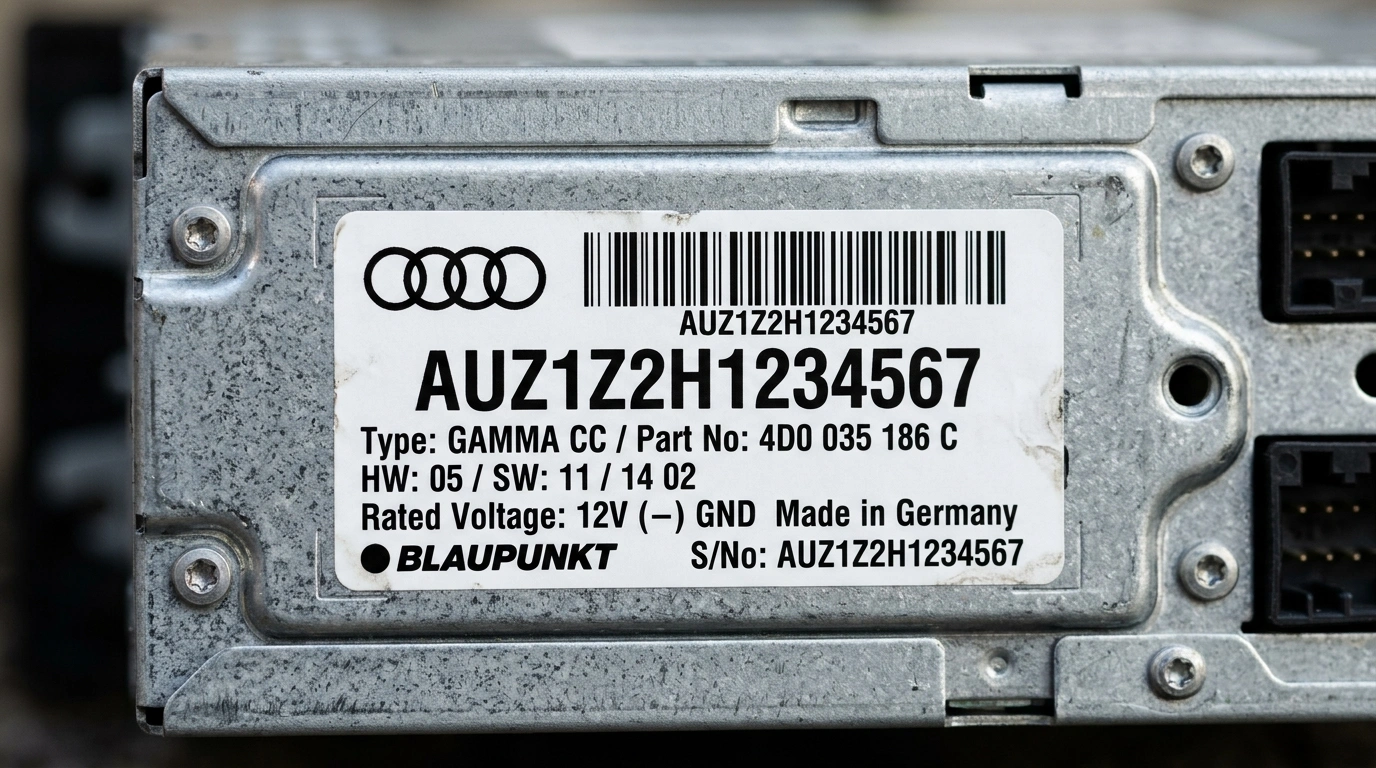
Find your serial number on the label
Your serial number is printed on a sticker or stamped on the side or rear of the casing. All Audi serials start with AUZ and are 14 characters long.

Common Audi radios
Pictured: Audi Concert. Other common units include Audi Symphony, Chorus, RNS-E Navigation Plus, and BNS 5.0. The serial number is located on the casing sticker.
How to Enter Your Audi Radio Code
Once you receive your 4-digit factory unlock code by email, follow these easy steps to enter it into your Audi stereo:
Audi radio codes by model
Go straight to the guide for your model.
What Our Customers Say
Read authentic reviews from vehicle owners who unlocked their stereos with our automated service.
“Entered the SKZ serial from my Škoda Octavia Bolero unit, got code within 3 minutes. Radio accepted the PIN immediately and music is back! Safe, fast and completely hassle-free.”
“My Škoda Superb battery went flat and my Swing unit locked in SAFE mode. The local dealer quoted £65 and 3 days wait. Entered my serial number here and got the working code in 3 minutes. Truly brilliant service!”
“Worked on the first attempt on my Škoda Fabia Dance stereo. Simple instructions, very fast email delivery and saved me a huge dealer fee. 10/10 recommend to anyone needing their radio unlocked.”